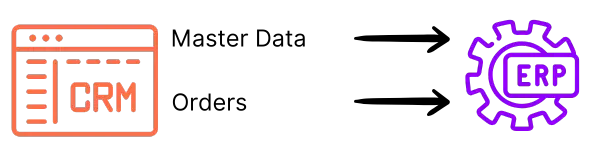
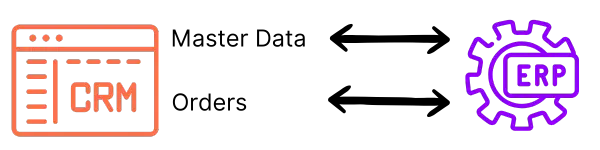
NetSuite is an interesting case, integration wise. It’s too complex to have a pre-packaged integration with, but it’s not complex enough so that people don’t try. Generally, any business has more custom work done on their ERP side than on the CRM side. That’s just nature, and where more of the delicate details are.
So what we see with HubSpot and NetSuite integrations is, even though sometimes the marketplace connectors are sufficient to create synchronization for some of the master data (e.g. companies, contacts, etc…), there is always a reason why a custom integration is needed. There is always a package, a set of custom rules that were put in place, a custom object in the middle of the process. And that piece is now fully ingrained in the business, it’s a part of how things work, and to get it to play nice with HubSpot we need to build at least some parts of the integration custom.
Here are some specific examples, so you know we’re not making this up:
The important thing is that processes on both systems are well understood and that the data flows that need to occur are clearly defined. Once that’s done, technical integration—what can be used from the marketplace connector and what needs to be custom—will fall in place almost naturally!

SuiteBilling, a package that simplifies and automates the management and billing of recurring subscriptions, also required us to change the Hubspot data model to ensure deals and line items lined up on both sides.
A customer who sells courses and has a 3rd party object to reflect them in NetSuite, which leads to the requirement to syncronize custom objects under specific business rules.
Files, or indirect associations with other objects have to be sent over from one side to the other.
The important thing is that processes on both systems are well understood and that the data flows that need to occur are clearly defined. Once that’s done, technical integration—what can be used from the marketplace connector and what needs to be custom—will fall in place almost naturally!

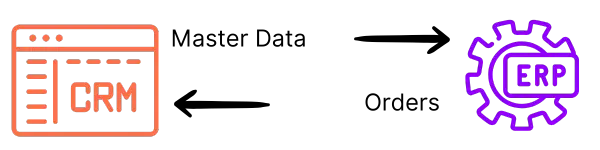
Due to the complexity and variety of products, a bidirectional interface is necessary in many companies. For example, to have a direct overview of stock levels when making offers, quotes, and orders are often created in the ERP. New customers, on the other hand, often come from the marketing automation solution or CRM.
Software or consulting firms do not have physical stock and often have a manageable service and product portfolio. Here, offers creating orders in the CRM makes sense, but they should also be available in ERP for service provisioning and billing.
If various distribution channels exist in parallel, things become more complex.. This happens when the business also sells parts of the products or services directly online. In this case, orders also come directly from the shop system into the ERP. However, to maintain a complete customer overview, it is necessary to either transfer this data from the commerce system or fetch the order data, including e- commerce contacts, from the ERP.
Increase efficiency
Greater transparency and a better cross-departmental flow of information within your company increases efficiency, avoids duplication of work, and allows employees to access high-quality and complete information faster.
This results in better alignment between Sales, Marketing and Service, which leads to more efficiency, balance of growth and scale, and overall improved business results. And yes, a customer-facing engine that is at the core of your customer-related processes and metrics.
900+ Customers around the world have trusted Periti to deliver complex projects to unlock the full potential of Technology. That is how we reached HubSpot Elite status and ranked in the top 3 global HubSpot partners in 2024.
Reach out and help us to become #1
Greater transparency and a better cross-departmental flow of information within your company increases efficiency, avoids duplication of work, and allows employees to access high-quality and complete information faster.
By integrating HubSpot and SAP data, you get a holistic view of your customers. The comprehensive information helps you make better decisions, avoid mistakes, and provide personalized customer care.
Knowing exactly who bought what and when can help you identify upsell, cross-sell, and re-sell potential. You can also use this information to segment customers and execute very targeted marketing campaigns.
When you integrate your CRM and ERP, you no longer have to transfer data from one system to the other manually. Not only will you reduce workload, you’ll also minimize errors and improve data quality.
By moving some processes from ERP to CRM, we’ve seen our clients realize significant savings on license fees. The ROI on these savings can be just a few months.